Materials:
1 * Arduino Kit and its contents
Lab Exercise:
Individually, build circuits 1 and 2. When you have finished building these circuits, you may copy the code from Arduino.cc or from the IDE examples and upload it to your Arduino. Document the circuits working.
For circuit 3, team up with another pair to form a group of four people. Together, you will build any one of the three circuits by. After the circuit is completed, upload the corresponding code to your Arduino. Then document the circuit working and your team interacting with it. For the circuit that you decide to build, draw your own schematic of how the components are connected, and include this with your documentation.
Note: The circuit diagram and code for Arduino can all be found on Tinkercad. To view the circuits and find the Arduino code, click on the links and sign in with your tinkercad account (or sign up if you don’t already have one).
Circuit 1: Fade
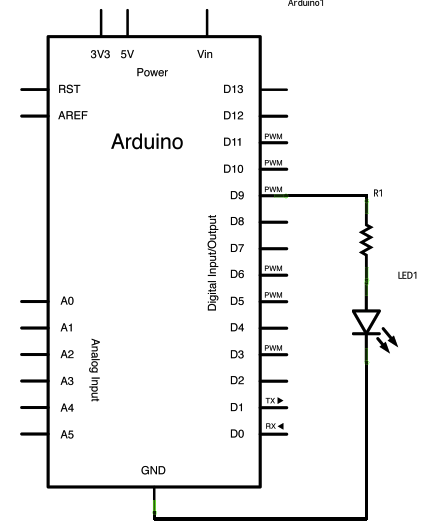
https://www.arduino.cc/en/Tutorial/Fade
Circuit 2: toneMelody
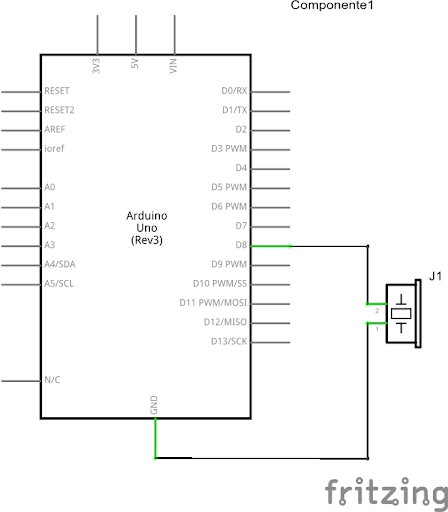
https://www.arduino.cc/en/Tutorial/toneMelody
Circuit 3:
Speed Game
A game of speed endurance. This is a two player game where each participant races to click a button more than their opponent. After 10 seconds, whoever has clicked their button the most and fastest wins!
https://www.tinkercad.com/things/8ZmiLy2FlSo
Documentation:
Please answer each of these questions. Add your answers to your post, along with the other documentation for the circuits that you built in class.
- Reflect on different interactions with technologies that you have observed in your daily life. Pick a few of these and write down your own definition of interaction based on your observations.
- During the assembly of the circuits, we used many electronic components as inputs and outputs. Which of these components do you recognize in the circuit?
- Watch the video: Zach Lieberman: Interactive Art and write your thoughts on interaction and the future of technology.