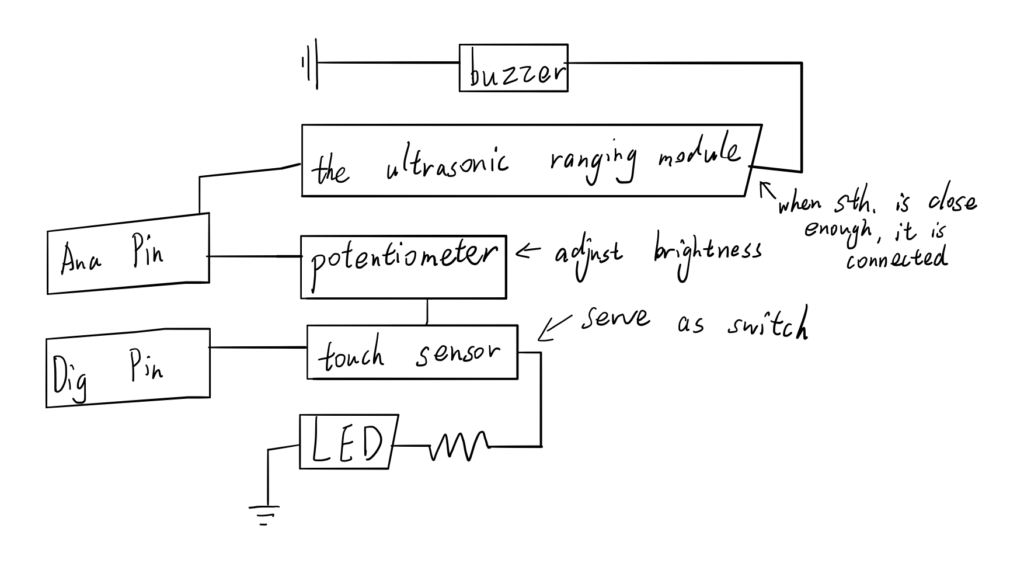
The touch sensor is served as a switch to control whether the light should be on or off. The potentiometer to control the brightness of the light. If you didn’t touch the touch sensor to turn on the LED, the potentiometer can’t control the brightness. It is similar to the light at home. when the ultrasonic ranging module detects that something is too close enough, the buzzer can alert us.
The user can control the output by themselves. And measures are implemented to alert the user. That’s safe and interesting.
Computer can influence people in daily life. It can make our life more comfortable and easy. It enables us to ajust the condition(the brightness, the humidness,etc.) I think it reduces our work. For example, if you want to withdraw the curtain to let the sunlight in, there is available technology that when you say ‘withdraw the curtain’, sensors can receive your voice, identify your needs and fulfill your needs. In the future, people may be more dependent on computers.
arduino code here:
const int sound_tri = 5;
int flag = -1;
void setup() {
// put your setup code here, to run once:
pinMode(2,OUTPUT);//buzzer
pinMode(sound_tri,OUTPUT);//sound triger
pinMode(6,OUTPUT);//LED
pinMode(A0,INPUT);//touch sensor
pinMode(A1,INPUT);//sound receiver
pinMode(A2,INPUT);//turn
Serial.begin(9600);
}
void blink(){
digitalWrite(6,HIGH);
delay(100);
digitalWrite(6,LOW);
delay(50);
}
void loop() {
int turn_sensor = analogRead(A2);
if (flag == 1){
analogWrite(6,map(turn_sensor,0,1023,0,255));
}
else{
digitalWrite(6,0);
}
digitalWrite(sound_tri,HIGH);
delayMicroseconds(5);
digitalWrite(sound_tri,LOW);
int sound_read = pulseIn(A1,HIGH);
if (sound_read<300 &&sound_read>0){
delay(30);
if (sound_read<300 && sound_read>0){
digitalWrite(2,HIGH);
}
}
else{
digitalWrite(2,LOW);
}
Serial.print(“This is the sound read data=”);
Serial.println(sound_read);
int touch_rec = analogRead(A0);
if (touch_rec !=0){
delay(60);
touch_rec = analogRead(A0);
if (touch_rec == 0){
flag =-flag;
}
}
// Serial.print(“touch receiver is”);
// Serial.println(touch_rec);
delay(60);
// put your main code here, to run repeatedly:
}
Leave a Reply
You must be logged in to post a comment.